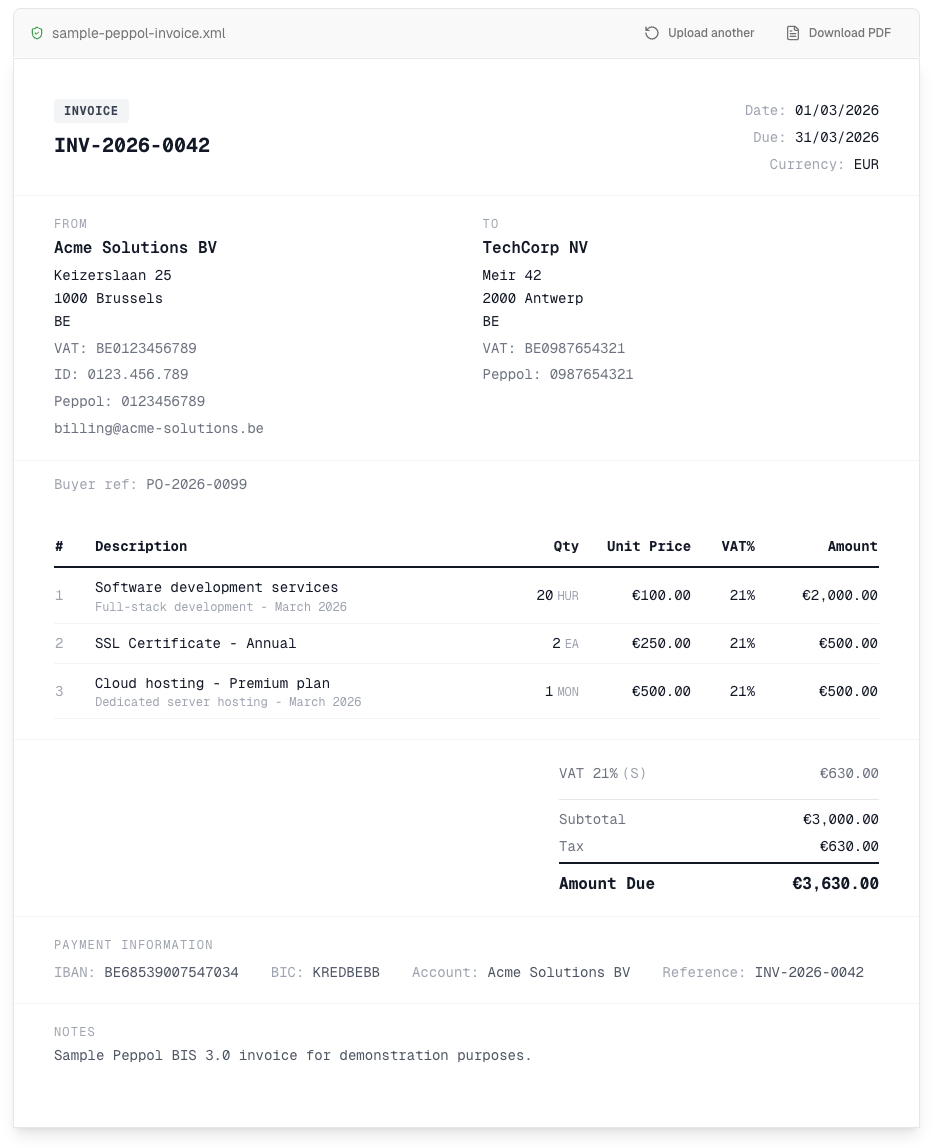
A Peppol viewer is an online tool that renders UBL 2.1 and Peppol BIS 3.0 XML invoices as readable documents in your browser. Upload your XML file below to see seller, buyer, line items, tax breakdown and payment details. Free, no signup required. Your files never leave your browser.
Upload UBL Invoice
Upload a Peppol BIS 3.0 or UBL 2.1 XML file. Supports both invoices and credit notes.
How it works
Upload, read, export.
01
Upload
Drag your .xml file. We parse it locally; nothing leaves your browser.
02
Read
Seller, buyer, line items, tax, payment. All laid out.
03
Export
Save as PDF via your browser's print dialog. Print-ready.
Need help with Peppol?
We can help. Technical experts, tax advisors, and e-invoicing specialists. First call is free.
A UBL viewer is a free online tool that opens a UBL 2.1 or Peppol BIS 3.0 XML invoice and displays it as a clean, readable document in your browser. UBL (Universal Business Language) 2.1 is the XML standard behind Peppol e-invoices. Drop any UBL invoice or credit note into the upload area above to view it online. Nothing is installed and no account is needed. The viewer parses all UBL 2.1 elements: seller and buyer parties, invoice lines with quantities and unit prices, tax subtotals, payment means, and due dates.
Whether you received a UBL file from your accountant, an ERP export, or the Peppol network, this UBL viewer handles it the same way. No conversion needed. Supports both Invoice and CreditNote document types. Want a printable copy instead? Use our Peppol XML to PDF converter to turn the same file into a PDF.
What is a Peppol invoice?
A Peppol invoice is an electronic invoice exchanged through Peppol, the international network businesses and tax authorities use to move invoices between accounting systems. It carries the same content as a paper or PDF invoice (seller and buyer, line items, taxes, payment details), but as structured XML in the UBL 2.1 / Peppol BIS Billing 3.0 format, so the receiving software reads every field automatically. No retyping, no OCR, no back-and-forth about typos. In Belgium, B2B invoicing via Peppol has been mandatory since January 2026; France, Germany, and other EU countries are rolling out similar mandates.
This viewer opens any Peppol invoice or UBL XML file and renders it as a clean, readable document so you can check what was actually sent or received over Peppol. Need a deeper look at the format? Read our UBL format guide for a field-by-field breakdown of a Peppol BIS 3.0 invoice.
What is a UBL XML invoice?
UBL (Universal Business Language) 2.1 is the international XML standard for structured business documents. A UBL invoice contains machine-readable data: seller and buyer details, line items with quantities and prices, tax breakdowns, and payment instructions. Peppol BIS Billing 3.0 is a profile built on top of UBL 2.1. It defines which fields are mandatory and how they should be filled in. UBL is the format used by the Peppol network for cross-border e-invoicing across Europe. To browse the schema field by field, open the UBL Format Explorer.
Supported formats
UBL 2.1 Invoice
Standard UBL invoices with full line item, tax, and payment details.
UBL 2.1 Credit Note
Credit notes with credited quantities and corrective references.
Peppol BIS 3.0
The European Peppol standard for cross-border e-invoicing. Built on UBL 2.1.
XML validation
Automatic XML structure checks. Detects malformed files and missing required fields.
What this tool validates
Well-formed XML
Checks that your file is valid XML with proper syntax, correctly nested elements, and no structural errors.
Root element validation
Verifies the root element is a UBL Invoice or CreditNote. Rejects non-UBL XML files immediately.
Required field checks
Validates that essential fields like the invoice ID, issue date, seller, and buyer information are present in the document.
UBL 2.1 namespace validation
Confirms the document uses the correct UBL 2.1 XML namespaces for CommonBasicComponents and CommonAggregateComponents.
Not included: full Schematron validation
This tool does not run Peppol BIS 3.0 Schematron business rule validation (e.g., tax category combinations, mandatory field rules per document type). For full compliance checking, see our guide to the best Peppol validation tools.
How the UBL viewer works
1
Upload your XML file
Drag and drop or click to select a UBL 2.1 or Peppol BIS 3.0 XML file from your computer.
2
Automatic parsing and validation
The viewer parses the XML structure, validates the document type, and extracts all invoice data. Everything happens in your browser.
3
View as a readable invoice
See your XML rendered as a clean, paper-style invoice with seller/buyer info, line items, tax breakdown, and payment details. Export to PDF via print. Need to convert PDFs the other way? Learn how to convert PDF invoices to Peppol.
100% private. No data leaves your browser.
This tool processes everything client-side using JavaScript. Your XML files are never sent to a server. No cookies, no tracking, no account required. Just open the page and upload your file.
Frequently asked questions
What file formats does this viewer support?
This viewer supports UBL 2.1 XML invoices and credit notes, including Peppol BIS Billing 3.0 documents. These are the standard formats used for e-invoicing across Europe and the Peppol network.
Is my invoice data safe?
Yes. The viewer runs entirely in your browser. Your XML files are never uploaded to any server. All parsing and rendering happens client-side using JavaScript, so your invoice data stays private.
What is a Peppol invoice?
A Peppol invoice is an electronic invoice exchanged through Peppol, the international network businesses and tax authorities use to move invoices between accounting systems. It carries the same content as a paper or PDF invoice (seller and buyer, line items, taxes, payment details), but as structured XML in the UBL 2.1 / Peppol BIS Billing 3.0 format, so the receiving software reads every field automatically. No retyping, no OCR, no back-and-forth about typos. In Belgium, B2B invoicing via Peppol has been mandatory since January 2026; France, Germany, and other EU countries are rolling out similar mandates.
What is a UBL XML invoice?
UBL (Universal Business Language) is an international XML standard for business documents like invoices and credit notes. UBL 2.1 is the version used by the Peppol network. A UBL XML invoice contains structured data such as seller and buyer details, line items, tax breakdowns, and payment information.
Does this tool validate my Peppol invoice?
The viewer performs basic XML structure validation. It checks that your file is well-formed XML, that the root element is a valid UBL Invoice or CreditNote, and that required fields like the invoice ID are present. For full Peppol BIS 3.0 business rule validation, use a dedicated Peppol validator.
Can I use this viewer for Belgian e-invoices?
Yes. Belgian e-invoices sent via Peppol use the UBL 2.1 / Peppol BIS 3.0 format, which is fully supported by this viewer. You can upload any XML invoice or credit note received through the Peppol network and view it as a clean, readable document.
How do I export the invoice as a PDF?
After uploading your XML file, click the print button or use Ctrl+P (Cmd+P on Mac). The viewer includes a print-optimized layout that produces a clean PDF when you select 'Save as PDF' in your browser's print dialog.
Is this a UBL validator?
This tool performs structural XML validation. It checks that your file is well-formed XML, that the root element is a UBL Invoice or CreditNote, that required fields like the invoice ID are present, and that UBL 2.1 namespaces are correct. It does not perform full Peppol BIS 3.0 Schematron validation, which checks business rules like valid tax category combinations. For complete Schematron validation, use a dedicated Peppol validation tool.
Can I view a Peppol credit note?
Yes. This viewer fully supports UBL 2.1 credit notes, including Peppol BIS 3.0 credit notes. Credit notes are displayed with a red label and include all the same details as invoices: seller/buyer info, line items, tax breakdown, and payment information.
How do I view a UBL invoice online?
Open this page, then drag and drop your UBL 2.1 or Peppol BIS 3.0 XML file onto the upload area, or click to choose a file. The viewer parses it and renders a clean, readable invoice in seconds. There is nothing to install and no account to create. It works online in any modern browser on desktop or mobile.
Is this UBL viewer free?
Yes. This online UBL and Peppol invoice viewer is completely free. There is no signup, no account, no trial, and no usage limit. You can view as many UBL 2.1 or Peppol BIS 3.0 invoices and credit notes as you want.
Is my invoice uploaded to a server or processed locally?
It is processed locally. Your XML file is read and parsed inside your own browser using JavaScript. The file is never uploaded to a server, never sent over the network, and never stored. When you close the tab, nothing remains. This makes the viewer safe for confidential invoices.